
Context: One Evening, One File, Fifteen Wasted Minutes
There was a file — somewhere in my cloud storage. I had saved it myself. I opened the first account. Nothing. The second. Still nothing. Third. Fourth. Folder after folder, the file stayed hidden as though it never existed.
15 minutes passed. I gave up.
The next morning I asked a friend. He didn’t hesitate: “Yes.” That single word sparked a larger question: was this just us, or a problem far more people quietly lived with?
Research: Asking the Question Out Loud
I ran a quick survey across WhatsApp groups. 65 people responded — and the results were more striking than I had expected.
Use more than one cloud storage account regularly
Spend at least 10 minutes searching for a single file
Feel frustrated by forgetting a file's name or location
It was a real, recurring problem — not a niche inconvenience. That was enough to take it seriously. It also reinforced a pattern I keep seeing in my design work: users rarely struggle because they are careless, they struggle because products hide structure behind too many layers.
Problem: Cloud Storage Follows Accounts, Not People
The navigation challenge reminded me of another workflow problem I explored in this ProjectHub UX case study, where users lost time moving through nested paths just to find the right context.
People spread their files across multiple services — Google Drive, Dropbox, OneDrive — with no single place to manage them. Over time, file names fade from memory, folder structures become messy, and everything quietly turns into a scattered pile spread across platforms that don’t talk to each other.
The result is not just wasted time. It is the slow loss of trust in your own storage. People stop relying on it, save duplicate copies just to be safe, and build workarounds that never really fix anything.
At the root sits a mental model mismatch. Platforms are built around accounts — log in, see files, log out. But nobody thinks “I need the file in my second Google account.” They think “I need that presentation from last month.” Users think about what the file is. Platforms think about which account it’s in. That gap is the real source of the problem.
What this creates is information fragmentation — files stuck in separate silos, with the user expected to be the connector that the platforms never provided. The files don’t belong to a platform. They belong to a person. The system just hasn’t caught up to that yet.
Cloud storage is account-first. It should be user-first.
Landscape: What Already Existed
Several tools had attempted parts of this problem — none solved it in full.
- MultCloud — Moves and syncs files across clouds, but the search is basic and can’t understand what’s inside a file.
- odrive — Puts all your clouds into one folder on your computer, but you can’t search by content.
- CloudFuze — Built for large businesses, way too complex for everyday users.
- Otixo — A team collaboration tool, not designed for personal file search.
- ExpanDrive — Connects cloud storage as a local drive on your computer — technical and narrow, not built for finding files.
Constraints: Why This Is Harder Than It Looks
Building this came with challenges that were not immediately obvious.
- Connecting Different Clouds — Every cloud service works differently and has its own login system, making it hard to bring them all together in one place.
- Keeping Data Safe — Users would be giving access to their most personal files, so security had to be the foundation — not a nice-to-have.
- Smart Searching — Building search that understands what a file is about — not just its name — requires a lot of work behind the scenes.
- Keeping Costs Low — The people who need this most are individuals, not big companies. Keeping it affordable had to be part of the plan from the start.
- Avoiding Subscription Fatigue — People already pay for multiple cloud services. Adding another one needed a very clear reason.
- Earning Trust — Asking someone to give access to all their files means being open and reliable — and that takes time to earn.
Design Principles
Every decision in building this was measured against five commitments.
- Make connecting all cloud accounts smooth and easy right from the start.
- Keep every user’s data private and secure — no exceptions.
- Make search smart — find files by what they’re about, not just the file name.
- Keep it affordable for individuals, not priced for big companies.
- Build trust by being clear, honest, and reliable at every step.
Solution: Introducing ScoutFiles
With those goals as the foundation, I built ScoutFiles — a unified platform that connects all your cloud accounts in one place, allowing you to search for any file using simple, natural keywords. Every design decision was a direct answer to something the research had surfaced.
My role covered the product end to end: framing the problem, gathering survey evidence, defining the product principles, designing the interface, and building the working concept.
Key Product Decisions
Connecting accounts was the first moment of trust. The answer was a secure, read-only connection — one simple permission, granted once. No ability to edit or delete files. Nothing stored on the server. The connection screen made that clear upfront, because trust is earned by being honest about exactly what you’re asking for.
The search interface was built around a simple insight: people don’t remember file names — they remember context. The meeting, the project, the rough date. The inspiration was the Google homepage: a logo, a single search bar, nothing else demanding attention. Type what you’re looking for, results appear. ScoutFiles used the same idea — one search bar front and centre, type in plain words, with filters for account, file type, and date range. Your files, searched the same way you already search everything else.
Results came back unified from every connected account, each one labelled clearly with its source platform and account. For the first time, the interface matched how people actually thought: not “which account is this in?” but simply “here are your files.”
Sign Up
Quick setup — no complicated steps before you can start
Connect Accounts
Give permission once — search your files any time
Search
Type in plain words — results from all accounts at once
Without a unified tool
With ScoutFiles
Working Prototype
The connections were live, search was functioning, and the core flow could be demonstrated end to end.
ScoutFiles Demo
Launch Constraint: When Reality Arrives Uninvited
Then, just as the product was ready to ship, the wall appeared.
Google Drive is the centrepiece of what ScoutFiles was built to solve. But Google restricts how its Drive access can be used in public products — to unlock it, you need to pass a Cloud Application Security Assessment (CASA).
CASA certification costs approximately $500 to obtain and must be renewed every single year. Without it, the Google Drive Readonly API can only operate in test mode, capped at a maximum of 100 users total across the entire application.
One hundred users. For a product built to reach thousands of people who search through their files every day and come up empty, that ceiling felt less like a limitation and more like a locked door.
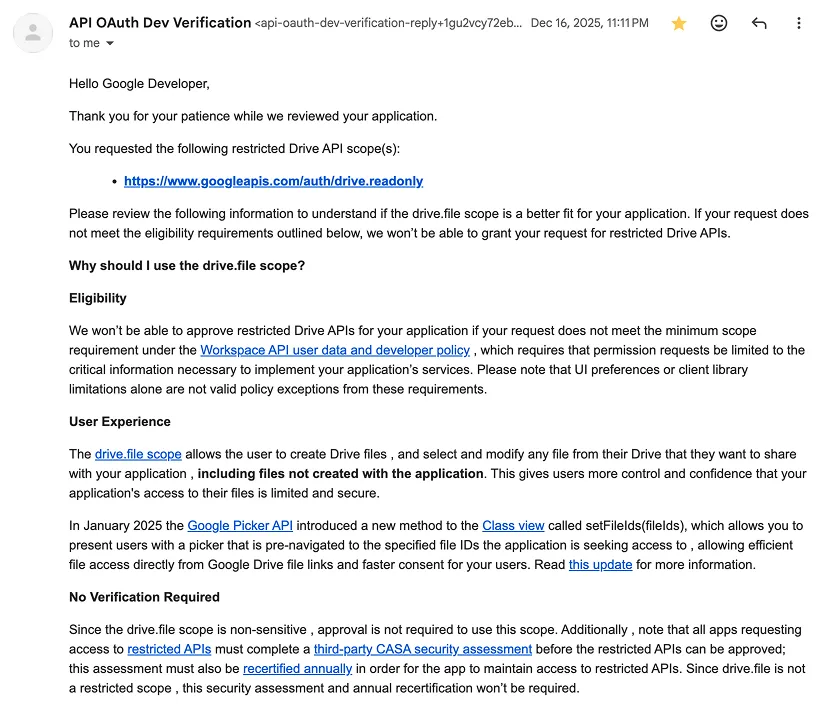
Google did offer an alternative API with no CASA requirement — but it required users to manually select files one by one every time they connected. A product built to eliminate file-finding friction would, in practice, add its own friction before a single search began.
Learning: The Answer to Why It Was Never Built
I had spent weeks wondering why no one had built this. The problem was obvious. The demand was there. The CASA requirement answered it — every builder who got close to shipping with Google Drive support hit the same wall.
Five hundred dollars a year — before a single user has signed up, before a single dollar has been made — is a real obstacle for any solo developer or small product. And without Google Drive, you’re not building a unified cloud search tool. You’re building an incomplete one.
This is the part of building products that rarely shows up in case studies — the moment you realise the problem is not a design problem, not a technical problem, and not a market problem. It is a structural one, sitting quietly between a good idea and the people it was meant for.
Next Steps: A Story Left Open
ScoutFiles was not abandoned. The problem it was built to solve has not disappeared. The people searching through multiple cloud accounts every week and who spend ten minutes looking for a single file still exist.
Some walls are worth going around. Some are worth paying to pass through. And some are worth documenting carefully — so that the next builder who arrives here knows exactly where they stand.